
iPod to Go – The iPod as a GTD capture device
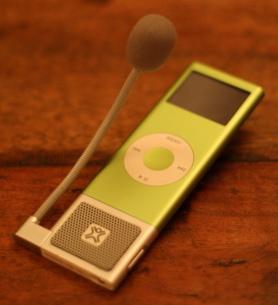 My personal mission to increase productivity, by decreasing the number of gadgets I use, took a sideways step recently. Since I started listening to podcasts, lectures and audio books, my iPod nano has become a fairly central part of my life. Now my new companion has even started listening to me, resulting in an even deeper relationship. We are spending lots of time together. I don’t think my family has noticed this new interloper yet, but I am sure it is only a matter of time.
The MicroMemo for iPod
Getting Things Done
Capturing thoughts and ideas rewards and encourages creative thinking. Rather than losing thoughts, you can capture them. Now your mind is free to move on to the next thought, knowing that you can act on the last one later. This is a positive cycle that rewards creative behaviour, because those creative thoughts get turned into action, rather than lost. Of course, you now need a ‘processing’ step to deal with all these new memos. The MicroMemo makes this easy, by syncing to iTunes. The next time I plug in to top up on pod-casts and music, the memos appear in their very own playlist, ready to be played back and acted on.
The MicroMemo isn’t just for short memos. You can record hours of dictation too. This blog post started off as a voice memo on the iPod. If you do use it for dictation, there is the small matter of transcription to deal with. Unless you are an accomplished touch typist, dictation can be a time consuming chore. However, help is at hand, thanks to the outsource your life principle of the 4 hour work week, and a handy blog post by the ever developing Matt. There are some very affordable on-line transcription services (Matt’s post covers some these services and his experiences with them). Isn’t life good?
I’ve used a pen and pad as my main capture device in the past. It works well, and I am sure that I will continue to do so, but voice memos do have a number of unique strengths. Voice memos put the ‘stuff’ that is captured ‘out of sight’. That means less clutter and distractions, reducing the noise from ideas coming back at you off of the page or piles of post it notes. Capturing verbally is also faster that writing and can be done on the move. You speak at around 200 words per minute but write at about 30, and that’s if you aren’t trying to use a pen and paper one-handed as you are running for a train. It is also useful to have an audio capture tool to hand during interesting talks – do ask permission before you record. You can also record your own speeches and presentations – a great way to reflect and improve your communication skills.
See Also: iPhone hits the UK and Information at Your Finger Tips
Hey, thanks for the link and the very useful post. Makes a lot of sense if you have an iPod. I’ll keep it in mind for clients.
One question: how do you manage the to do items in particular? I found that actions move so fast, I would have to download and transcribe at least daily, which was too much of a pain. I’d like to hear how you made it work…
Hi Matt – Sure thing… I think I’ll save it for a full post. It is working well so far, but I’m still learning! I like having a buffer between ‘must do that’ and ‘do that’, so that important things don’t get crushed by urgent ones. We’ll have to compare notes!
Can’t the voice file be piped through a voice recognition program such as Dragon?
Now that is a rather fantastic idea. I haven’t used Dragon, so I don’t know. I’ll add it to my ‘to do someday’ list!
Thanks for the great article. Keep up the good work.
I’ve been capturing song ideas on the MicroMemo (on an 4G iPod) for almost a year, and it’s still my 21st century dictaphone of choice, largely because of the seamless iTunes synching.
Now I’m thinking about talking into it too…
The audio quality rivals much of the pro here in the studio – I have used it to record rehearsals and pre-production demos. Very good value for money too!
For voice memos I am increasingly using my mobile phone, as that means one less thing to carry.
You mention the relative speeds of speaking and writing I would say that another item needs putting into the equation.Content .. I write as one who struggles with the written word.. if you can speak at 100 words a minute that can add up to to plenty of old bull .tho its slow the discipline of writing can filter out some of the less productive items and give oppertunity for fine tuning . so both speaking and writing are good handled correctly they can release direct communicate and refine and bring to a point .Period .Now and a picture well that can do the work of the a thousand words but sometimes needs an explanitary note . so up with content up with focus and on with the show what ever the gadget can do grab it and if its doesn do it .bin it and move on.
ps I am savin for and i phone or some such
Very good point, Ossie…. It is the production aspect of content. The written word usually at least has the once over, while speech is just speech. Podcasts are changing that slightly, with more planning and editting coming in. Likewise, blogs are a long way from the written letters of old.
Content is king, at least some of the time. Rubbish is rubbish, regardless of how quickly or slowly it is consumed.
Why viewers still use to read news papers when in this technological globe all is available
on web?